Phonons: the vibrations of silicon
Phonons are the vibrations of the atoms in a crystal. Their frequencies along a path through the Brillouin zone (the phonon dispersion) show how the crystal responds to small displacements, and they set its heat capacity and its zero-point energy. In this tutorial you calculate the phonon dispersion of silicon with a workflow that SiestaStudio exports and runs in three steps:
- relax the structure,
- compute the force constants: displace each atom a little in a supercell
and record the forces on all the others (SIESTA, with the
fcbuildutility building the supercell), - turn the force constants into phonon frequencies along a k-path (the
vibrautility).
It takes about 20 minutes; the workflow runs in about 4 minutes on a laptop.
Before you start
- A SiestaStudio account and SIESTA 5 on your computer, with its utilities
fcbuildandvibra(they come with SIESTA). - Your first calculation explains the downloads and Analyze File; Relaxing a structure explains relaxations.
1. Build the silicon primitive cell
Create a project Si phonons, open the studio, and click Edit Structure.
In Generate Structure choose Diamond Cubic, set a to 5.43 Å and
the element to Si, and click Generate Structure (8 atoms). Then open
Symmetry and click Primitive Cell: the status bar shows 2 atoms.
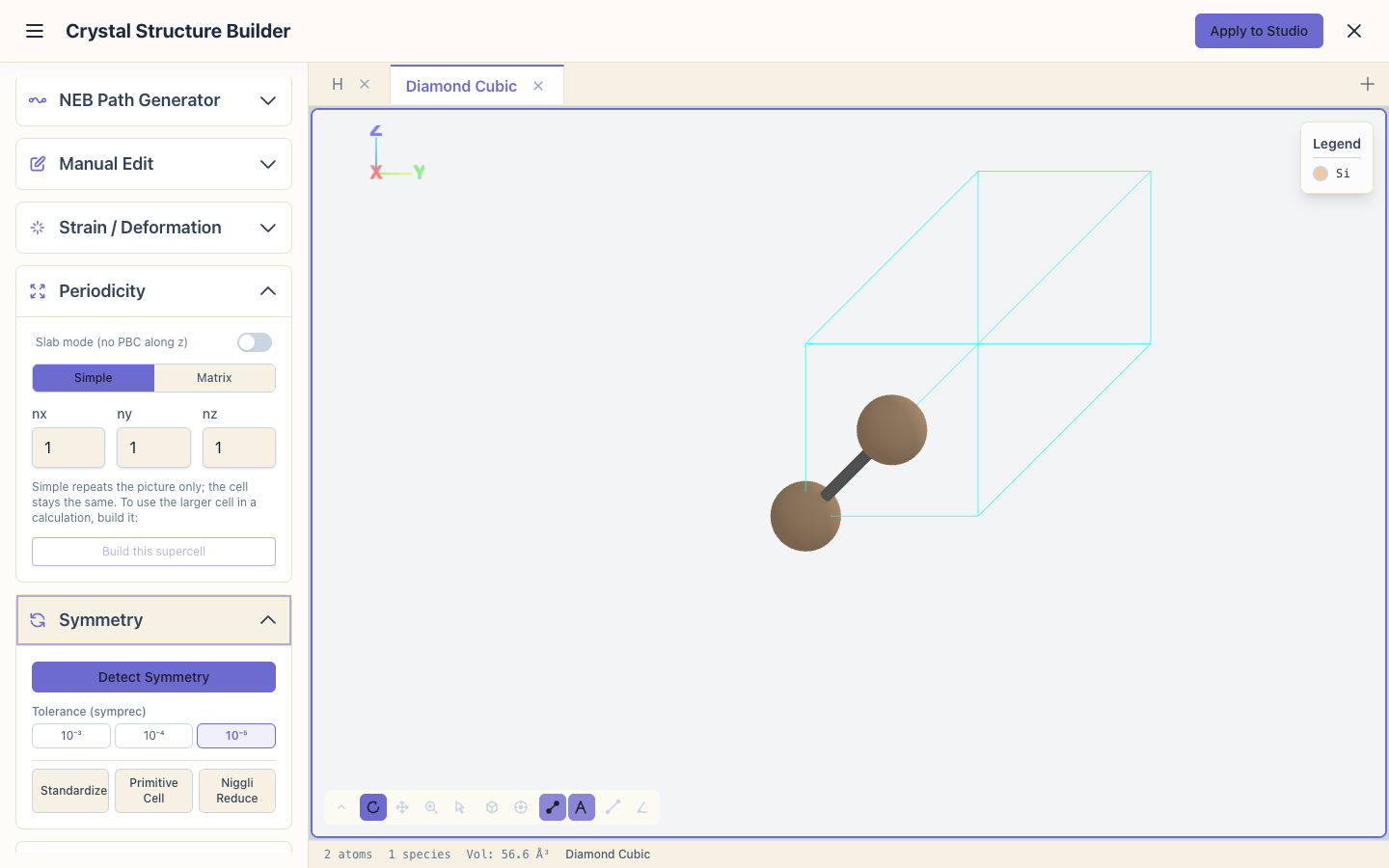
The force constants are computed in a supercell built from this cell, so the
smaller the cell, the cheaper the calculation. Click Apply to Studio and
set the System Name to Si.
2. Set up the calculation
Open the wizard and choose Bulk Crystal, Semiconductor, Geometry optimization and Quick, then Apply All. Quick (SZP basis, mesh cutoff 150 Ry) keeps the force-constant run short; use Standard or better for numbers you want to publish.

3. The k-path for the phonon bands
vibra computes the frequencies along the same k-path as an electronic band
structure. In DOS & Band Structure, switch on Enable Band Structure
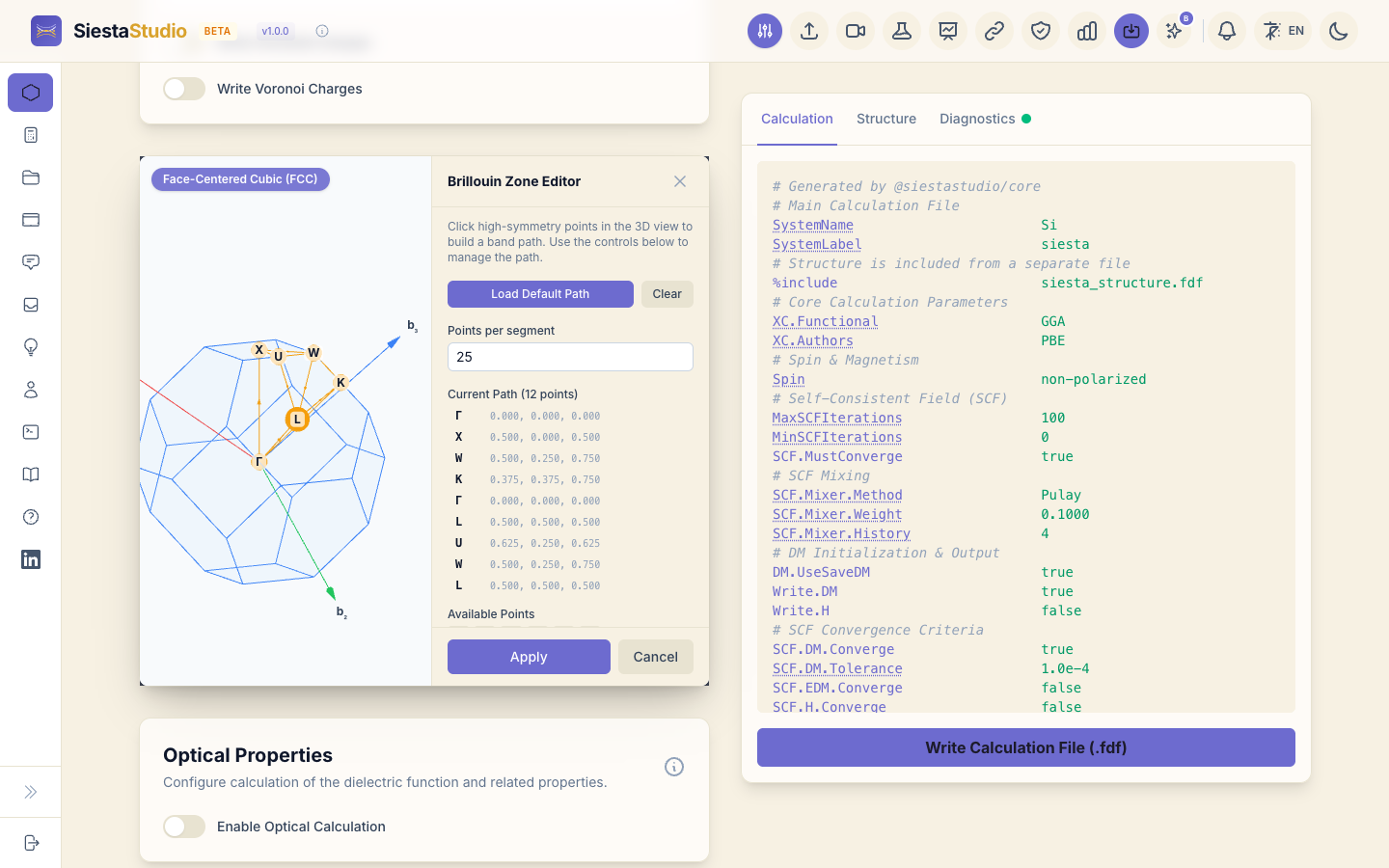
Calculation, click Open BZ Editor, and click Apply: the editor
recognises the face-centred cubic cell and writes the standard path
Γ-X-W-K-Γ-L-U-W-L-K-U-X.
4. Check, download the pseudopotentials and save
Diagnostics reports All parameters look good! Download the
pseudopotentials (Pseudopotentials, Download All (ZIP)) and save the
calculation as Si.
5. The phonon workflow
Click Workflow Builder in the header. Under Built-in Templates, choose Phonon dispersion (relax → FC → vibra).
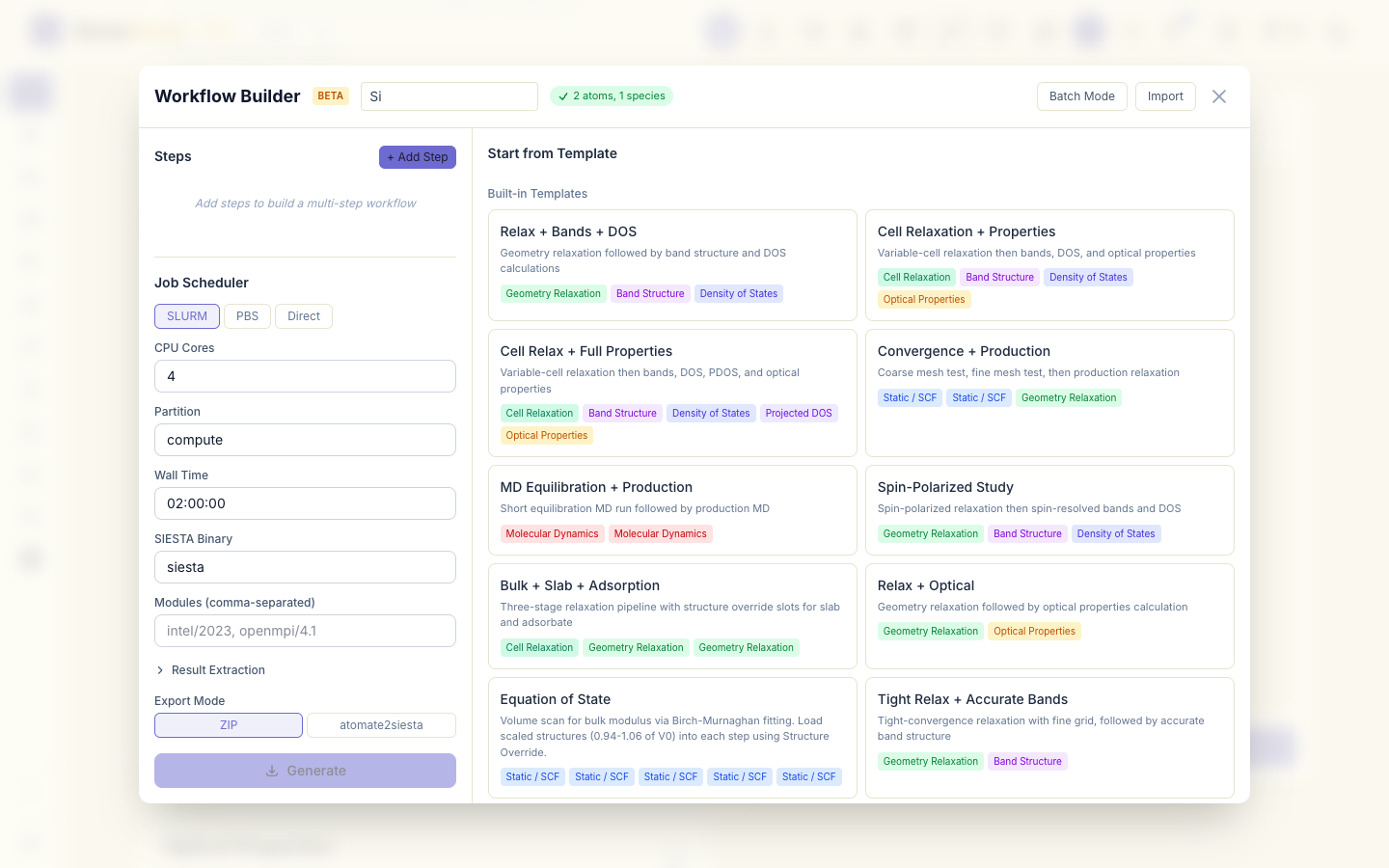
The workflow has three steps: Relaxation, Force Constants and
Vibra (phonon dispersion). Select a step to see its settings; Edit in
Studio on the vibra step opens the vibra panel, where the supercell size
and a k-path of its own can be set. The defaults are what this tutorial uses:
a supercell of 3 × 3 × 3 primitive cells (SuperCell_1/2/3 = 1), and the
k-path of the calculation.

Under Job Scheduler choose Direct, set CPU Cores to 1, and click
Generate. You get workflow_si.zip.

6. Run the workflow
Unzip it, put the pseudopotentials in pseudos/ (or let the script download
them), and run:
sh download_pseudos.sh
bash submit_workflow.sh
The script runs the steps in order and stops with a message if a step did not produce its output:
01_relaxation: SIESTA relaxes the cell's atoms (for perfect silicon the forces are already zero, so it stops after one step).02_fc: the script first rewrites the geometry from the relaxedsiesta.XV, then runsfcbuild, which writesFC.fdf, a supercell of 54 atoms. SIESTA displaces each of the 2 atoms of the original cell by 0.04 Bohr in each direction (12 calculations) and writes the force constants tosiesta.FC. This is the long step, about 3 minutes.03_vibra:vibrareadssiesta.FCand writessiesta.bands, the phonon frequencies along the path in cm⁻¹, andsiesta.vectors, the vibration patterns.
7. The phonon dispersion
Click Analyze File and drop 03_vibra/siesta.bands. SiestaStudio
recognises the phonon file and shows Phonon dispersion — 6 branches × 252
k-points: two atoms give six branches, three acoustic and three optical.
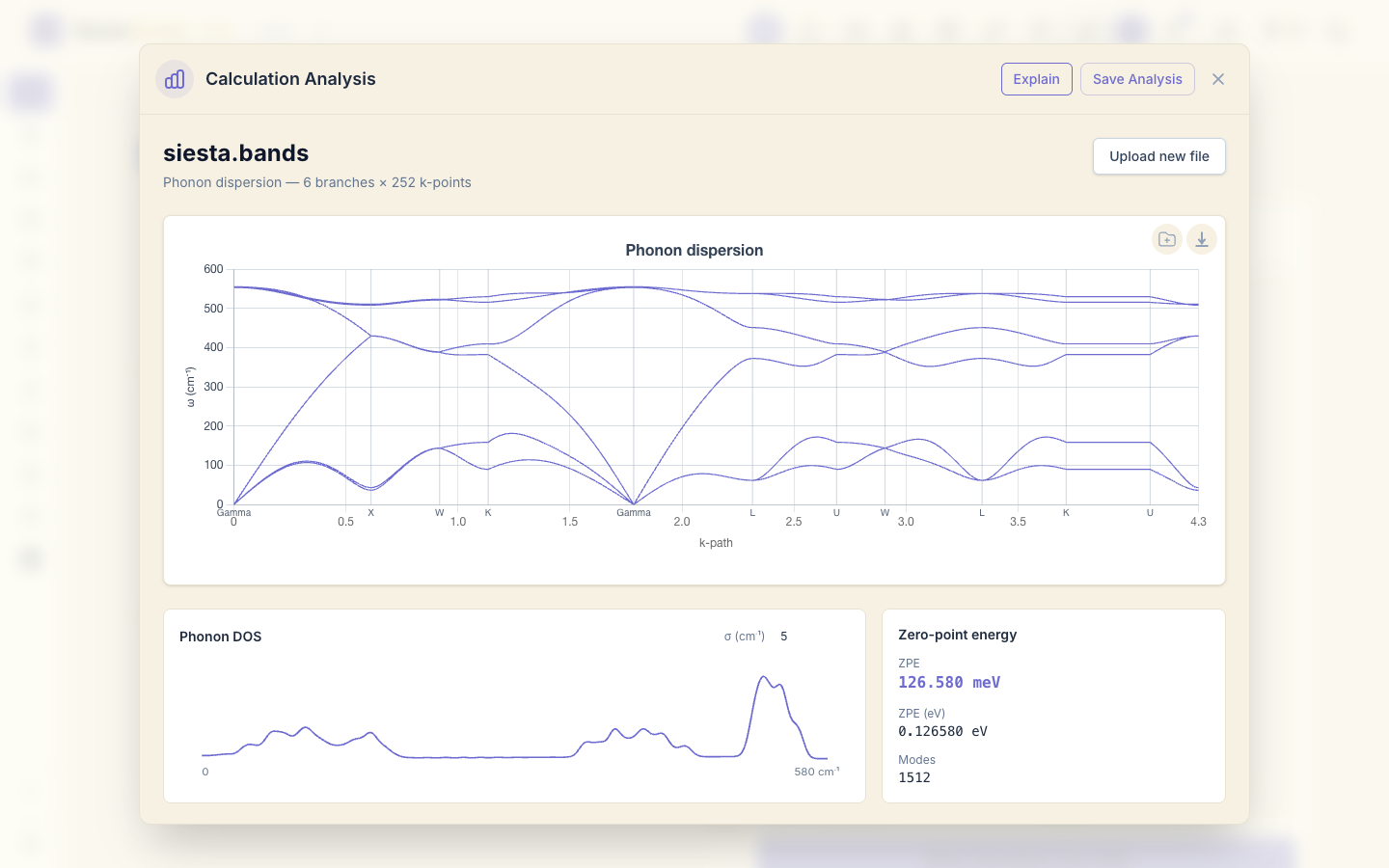
Read it from left to right:
- At Γ the three acoustic branches start at 0: moving the whole crystal costs no energy. This is the first check of a phonon calculation; values far from zero would mean the force constants are not converged.
- The three optical branches at Γ are at 554–555 cm⁻¹. The measured value for silicon is 517 cm⁻¹; the Quick basis gives a slightly stiffer crystal.
- No frequency is negative anywhere on the path, so the structure is stable.
- At X the longitudinal branches meet at 430 cm⁻¹ (measured 410) and the transverse optical branch is at 508–511 cm⁻¹ (measured 463).
- The transverse acoustic branch is too soft near X and L: 37–43 cm⁻¹ at X
against 150 cm⁻¹ measured. Its frequencies there depend on force
constants between atoms further apart than a 3 × 3 × 3 supercell holds.
A larger supercell (
SuperCell_i = 2, 250 atoms) improves it, at a much higher cost.
Below the plot, Phonon DOS counts the frequencies along the path, and Zero-point energy gives ½ Σ ħω averaged over the path points: 126.6 meV per cell here. Both are estimates from the path; a dense sampling of the whole Brillouin zone gives the exact values.
8. Save the analysis
Click Save Analysis and choose the project Si phonons.
What next
- Relaxing a structure: relax a structure with a defect before computing its phonons.
- Workflows at scale: the Workflow Builder in more depth.